
Reolink Home Hub Wireless Security Center with Local Storage Supports up to 512GB*2 and 8 IP Cameras
- Specification
- Overview
- Customers Also Bought
- Your Recently Viewed Items
- Reviews



'%3e%3cpath%20d='M30%205.625C36.4647%205.625%2042.6645%208.19307%2047.2357%2012.7643C51.8069%2017.3355%2054.375%2023.5353%2054.375%2030C54.375%2036.4647%2051.8069%2042.6645%2047.2357%2047.2357C42.6645%2051.8069%2036.4647%2054.375%2030%2054.375C23.5353%2054.375%2017.3355%2051.8069%2012.7643%2047.2357C8.19307%2042.6645%205.625%2036.4647%205.625%2030C5.625%2023.5353%208.19307%2017.3355%2012.7643%2012.7643C17.3355%208.19307%2023.5353%205.625%2030%205.625ZM30%2060C37.9565%2060%2045.5871%2056.8393%2051.2132%2051.2132C56.8393%2045.5871%2060%2037.9565%2060%2030C60%2022.0435%2056.8393%2014.4129%2051.2132%208.7868C45.5871%203.16071%2037.9565%200%2030%200C22.0435%200%2014.4129%203.16071%208.7868%208.7868C3.16071%2014.4129%200%2022.0435%200%2030C0%2037.9565%203.16071%2045.5871%208.7868%2051.2132C14.4129%2056.8393%2022.0435%2060%2030%2060ZM43.2422%2024.4922C44.3438%2023.3906%2044.3438%2021.6094%2043.2422%2020.5195C42.1406%2019.4297%2040.3594%2019.418%2039.2695%2020.5195L26.2617%2033.5273L20.7539%2028.0195C19.6523%2026.918%2017.8711%2026.918%2016.7812%2028.0195C15.6914%2029.1211%2015.6797%2030.9023%2016.7812%2031.9922L24.2812%2039.4922C25.3828%2040.5938%2027.1641%2040.5938%2028.2539%2039.4922L43.2422%2024.4922Z'%20fill='%2300A046'/%3e%3ccircle%20cx='30.5'%20cy='29.5'%20r='20.5'%20fill='white'/%3e%3cpath%20d='M21.8175%2037H18.7395L13.5915%2029.206V37H10.5135V24.364H13.5915L18.7395%2032.194V24.364H21.8175V37ZM27.1266%2026.83V29.386H31.2486V31.762H27.1266V34.534H31.7886V37H24.0486V24.364H31.7886V26.83H27.1266ZM51.1749%2024.364L47.8809%2037H44.1549L42.1389%2028.684L40.0509%2037H36.3249L33.1209%2024.364H36.4149L38.2329%2033.562L40.4829%2024.364H43.8669L46.0269%2033.562L47.8629%2024.364H51.1749Z'%20fill='%2300A046'/%3e%3c/g%3e%3cdefs%3e%3cclipPath%20id='clip0_10639_3631'%3e%3crect%20width='60'%20height='60'%20fill='white'/%3e%3c/clipPath%3e%3c/defs%3e%3c/svg%3e)

Overview
Local Security, No Extra Costs
Get more control over your data with Reolink Home Hub. With an included 64GB microSD card and expandable up to 2x512GB with two microSD card slots, you have the ultimate storage flexibility. Compared to Cloud storage, this hub keeps your recordings and privacy fully protected locally at no potential risk or additional cost.
All-in-One Security Solution
Supercharge your security system management with the Reolink Home Hub. Supporting up to 16MP ultra-high definition and up to 8 Reolink cameras, including dual-band Wi-Fi cameras and Wi-Fi 6 cameras, it offers great flexibility to customize your security center to match your preferences.
Encrypted Storage
Reolink Home Hub is armed with exclusive encryption algorithms, providing premium data protection against unauthorized access, even if your devices or SD cards are stolen.
Offline Recording
Enjoy true offline storage with all your recordings stored locally. No worries about data lose even if the network connection is interrupted. Rest easy knowing your videos are secured better than ever before.
LAN Access
The home hub creates a local LAN network, enabling your security cameras to function seamlessly without the need for an Internet connection.
High-Definition Live View & Playback
With just a few taps on the Reolink App, you can easily access live feeds and playbacks of high-definition main streams from multiple devices.
Reliable Alarm Center
The Reolink Home Hub will sound an alarm when any connected IP camera is triggered, providing comprehensive protection with multi-layered alarms. It features a variety of alarm ringtones for you to choose from, or you can customize your own.
Features:
- Built-in 64GB microSD Card
- Up to 512GB*2 microSD Card Storage
- Up to 8 Reolink IP Cameras
- No Monthly Fees
Simple & Tidy Setup
Step 1 - Set up the hub.
Connect the Reolink Home Hub to power, and then use the included Ethernet cable to connect it to the router.
Step 2 - Initialize the hub.
Open the Reolink App, follow the instructions to complete the initial setup, and then add your camera to the Hub.
Step 3 - Add the cameras.
There are two ways to add cameras: from the list of devices on the LAN or by scanning the QR code.
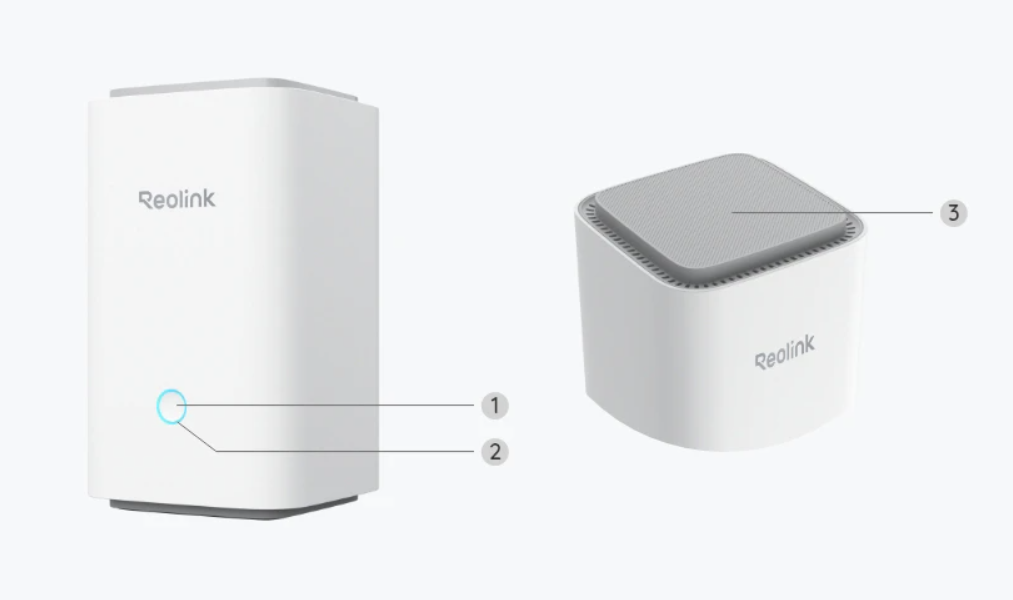
- Button
- Indicator Light
- Vent
Package includes:
- Reolink Home Hub
- micro SD Card
- Power Adapter
- 1m Network Cable
For more information, please see Data Sheet.